 Vaulta
Zero-based budgeting, and how to do it on your iPhone.
In a zero-based budget every unit of income has a job. Income minus all planned spending and saving equals zero. Here is how to do it, and where Vaulta helps.
Free plan with no time limit. Pro is free for 7 days. Screens show sample data.
The idea in one sentence
Zero-based budgeting means you plan every bit of this month's income before the month starts, so that income minus planned spending, saving and debt payments equals zero. It does not mean you spend everything. Saving is a line in the plan like any other.
The strength of the method is that no money is left unassigned. Money without a job tends to drift into things you did not choose.
A labelled example
Say your take-home pay is 2,800 this month.
| Line | Amount |
|---|---|
| Rent | 1,000 |
| Utilities and phone | 180 |
| Groceries | 350 |
| Transport | 120 |
| Eating out and fun | 200 |
| Emergency fund | 250 |
| Holiday goal | 150 |
| Debt above the minimum | 200 |
| Irregular bills (insurance, gifts) | 150 |
| Buffer | 200 |
The lines add to 2,800. Income minus plan is zero, which is the whole point. If you want to add a new line, something else has to shrink.
Why people like it, and when it frustrates
It works well for people who like clear rules and whose income is steady. It suits periods when you are paying off debt or saving hard. It can frustrate people whose month is unpredictable, because planning to the penny is hard when you do not know what you will earn. If that is you, plan to the income you are certain of and treat the rest as a bonus; the Journal covers this in irregular income budgeting.
Read the full method in zero-based budgeting explained.
Where Vaulta helps, and where it does not
Vaulta does not force you into zero-based budgeting, and it does not have a dedicated "assign every unit" screen. It is more useful to be straight about that than to pretend otherwise. What it does give you are the pieces:
- Budgets with a monthly amount per category, showing what is left. Three on Free, unlimited on Pro and Premium.
- Goals with a date, whose monthly amounts come out of safe to spend.
- Bills in one list with due dates, subtracted from the daily number.
- Safe to spend, which shows what remains after the bills and goals you have already planned.
So you can build a zero-based plan with budgets for each category and goals for the savings lines. If you have more than three categories, you will want Pro. The sum check, income minus plan equals zero, you can do on the back of an envelope or in the 50/30/20 calculator as a sanity check.
Doing it each month
- Write down expected income.
- List fixed costs first: rent, utilities, debt minimums.
- Add savings and goals.
- Fill in variable costs: groceries, transport, fun.
- Adjust until income minus plan is zero.
- Track during the month and fix drift weekly, not at month end.
Common mistakes
Forgetting yearly bills is the big one; use sinking funds. Setting grocery and fun amounts too tight is next: leave a small buffer so one expensive week does not break the plan.
When to switch method
If the zero-based method feels like a second job after two months, loosen it. Many people move to a simpler rule such as 50/30/20, or to tracking only a few categories and letting the rest ride. The method is a tool. If it stops helping, change the tool, not your opinion of yourself.
In the app
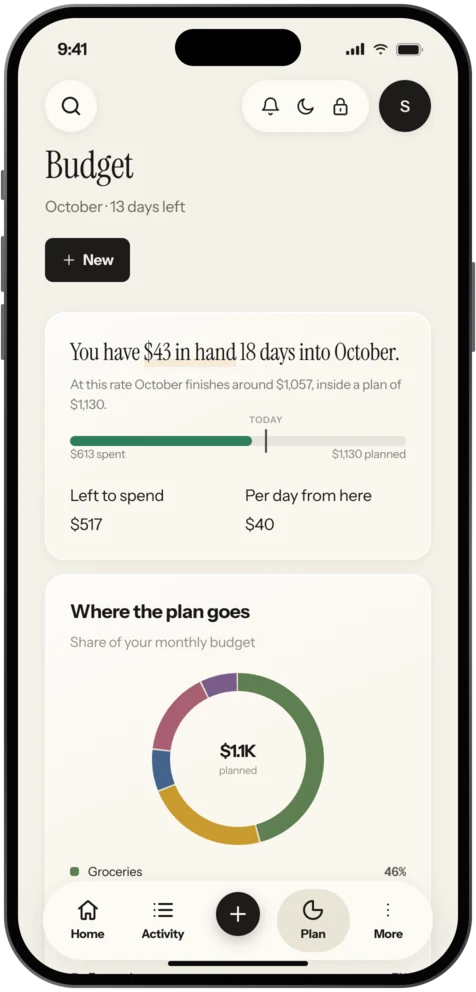
How to set it up in Vaulta
- Enter this month's income and fixed bills.
- Create budgets for the categories that matter, up to three on Free.
- Add goals for savings and debt targets.
- Check that planned amounts add up to your income.
- Track through the month with Safe to spend and the budget screens.
Questions.
Does Vaulta have a zero-based budgeting mode?
No. It gives you budgets, goals and bills you can use to build a zero-based plan, but it does not enforce one.
Do I have to spend everything?
No. Savings and debt payments are lines in the plan. The rule is that every unit has a job.
How many categories can I use?
Three budgets on Free. Unlimited on Pro and Premium.
What if my income varies?
Plan to the income you are certain of and treat extra income as a bonus to allocate when it arrives.
Related
Budget app for iPhoneVaulta is a budget app for iPhone built around one number: what you can spend today. Free plan with no time limit. Coming to the App Store.50/30/20 budget calculatorEnter your take-home pay and see how the 50/30/20 rule splits it into needs, wants and savings. Change the percentages to fit your life. Free.Savings goalsName a goal, pick a date and see the monthly amount and whether you are on track. Savings goals that feed safe to spend. Coming to the App Store.Budgeting for couplesHow couples can budget together without fights: three common setups, a monthly money meeting, and how Vaulta fits. Honest about limits.Coming to the App Store.
Free to start. Pro is free for 7 days.