 Vaulta
A cash flow forecast built from your own numbers.
Where will your balance be in three months? Vaulta projects it from what you have recorded, shows its working and says plainly that a projection is not a promise.
Free plan with no time limit. Pro is free for 7 days. Screens show sample data.
What a cash flow forecast is
A budget looks at categories. A cash flow forecast looks at time. It asks: given the money coming in, the bills going out and the spending I normally do, what will my balance look like at the end of each month?
That is a different and sometimes more valuable question. A budget can be perfect and you can still be short in March because the insurance, the tax bill and a holiday all landed in the same four weeks. A forecast shows the dip before you are in it.
How Vaulta builds the forecast
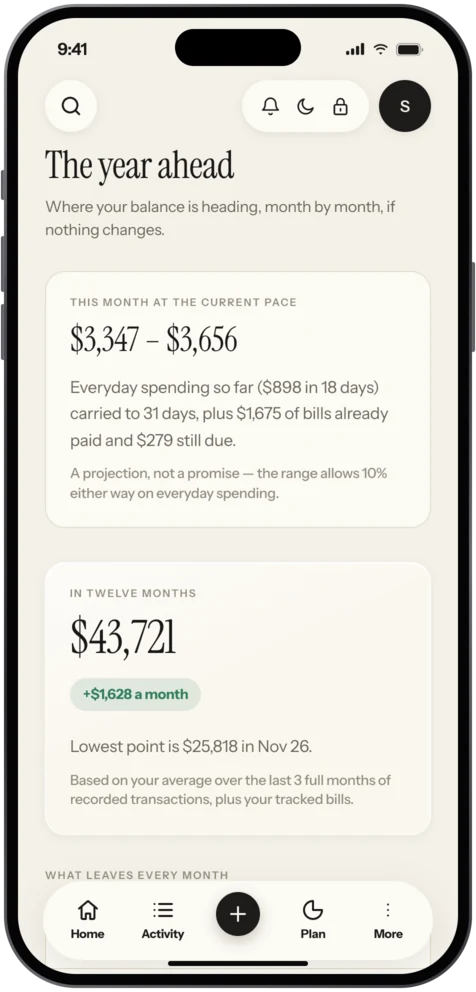
On Pro and Premium, the forecast uses your own recorded transactions, your listed bills and your goals. It draws your balance month by month as a range, not a single line, and shows the reasoning behind it. The range matters because the future is uncertain, and a forecast that pretends otherwise is making a claim it cannot back up. The screen says clearly that a projection is not a promise.
The more of your regular income and bills you have recorded, the more useful it is. Three or four months of history gives it something solid to work from.
Reading it
Look for three things:
- The lowest point. When does the balance dip most, and by how much? That is the month to prepare for.
- The direction. Over the year, does the line rise, fall or drift? Falling with no obvious reason usually means regular spending is bigger than you thought.
- The width of the range. A wide band means your spending varies a lot. Smoothing that out, for example with sinking funds, narrows it.
The Journal piece on reading a cash flow forecast walks through a labelled example in detail.
An example, labelled as one
Suppose your balance is 3,000 at the start of the month, you earn 2,600 and your regular spending and bills come to 2,450. That is a monthly gain of 150. But in month three a 700 insurance bill lands. Over three months the balance goes 3,150, 3,300 and then 2,750. The yearly view looks fine, but month three is the one where you could be caught out if you were also planning a purchase. A forecast surfaces that in advance.
Who benefits most
People with irregular income, such as freelancers (read saving with irregular income), people with big annual bills, and people who are saving for a date, such as a house deposit. If your income and expenses are the same every month, a forecast will be flat and less exciting, though still a useful reassurance.
What it cannot do
It cannot predict a job loss, a car breakdown or a windfall. It extrapolates your own history. It is built from your recorded numbers rather than from bank feeds, unless you are on Pro or Premium in one of the eight linking countries and have chosen to link. Vaulta also does not give investment forecasts: market data in the app is simulated.
Using the forecast to decide
Before a big purchase, look at the lowest point in the coming months. If buying now takes that point close to zero, wait, or pay in smaller pieces. Before a holiday, check that the month after it is not already tight. The forecast is a way to ask "what would this do to me in three months?" while the answer can still change your decision.
In the app
How it works in Vaulta
- Record income and bills for a few months.
- Open the forecast to see your balance month by month.
- Find the lowest point and read the reasoning behind it.
- Add a goal or adjust a bill and see how the range moves.
- Revisit it monthly as new transactions come in.
Questions.
Which plan includes the forecast?
Pro and Premium.
Is the forecast a guarantee?
No. It is a projection from your own transactions, shown as a range, and the screen says it is not a promise.
How much history does it need?
More is better. A few months of recorded income and bills gives it something solid to work from.
Does it forecast investments?
No. Market data in Vaulta is simulated.
Related
Bill remindersList every bill with due dates, monthly and yearly totals, and local reminders on your iPhone. Bills feed safe to spend. Coming to the App Store.Savings goalsName a goal, pick a date and see the monthly amount and whether you are on track. Savings goals that feed safe to spend. Coming to the App Store.Subscription trackerSee every subscription with its monthly and yearly cost, and let the radar find recurring charges you forgot. Coming to the App Store.Net worth trackerTrack net worth on iPhone: add accounts by hand, see one figure and how it changes over time. Bank linking in eight countries. Coming to the App Store.Coming to the App Store.
Free to start. Pro is free for 7 days.