 Vaulta
A bill reminder app that also protects the rest of your month.
A reminder tells you a bill is due. Vaulta also takes the bill out of what you can spend, so the money is still there when it lands.
Free plan with no time limit. Pro is free for 7 days. Screens show sample data.
Late fees are a design problem
Nobody forgets bills on purpose. They forget because bills arrive on different dates, in different places, in different amounts. The rent is on the first, the phone on the ninth, the insurance in March, the water whenever the meter is read.
Two things fix this. First, one list that holds every bill with its due date and amount. Second, a way to keep the money for those bills out of reach until they are paid. A reminder alone solves the first; it does nothing about the second.
Bills in Vaulta
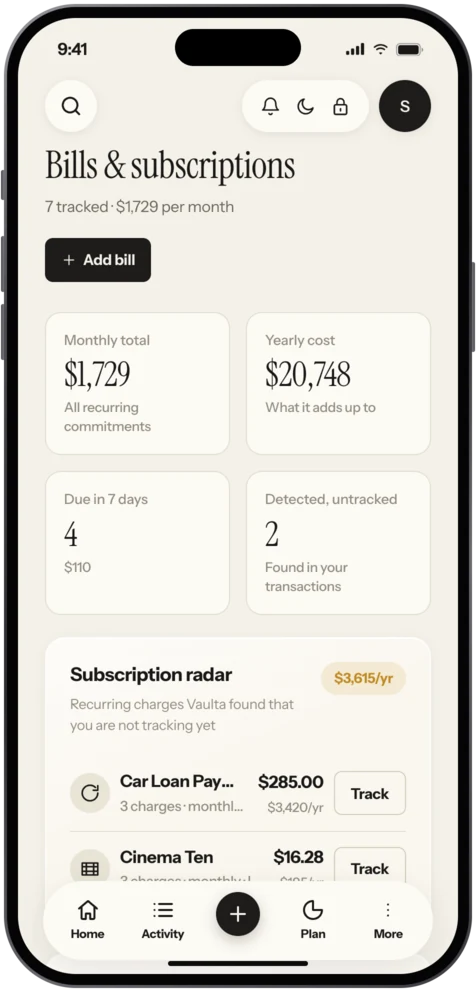
Every bill goes in one list with a due date, an amount and how often it repeats. The list shows what each bill costs per month and per year, which is often the more sobering number. A subscription of 9.99 a month sounds small. It is 119.88 a year.
Reminders for bills are local to your device. They are scheduled on your iPhone, not sent from a server, so they work without a connection and without Vaulta knowing when your rent is due.
Why this changes the daily number
The bills still to come this month are subtracted when Vaulta works out safe to spend. If your balance is 900 and 650 of it belongs to rent and the electric bill due in a week, your safe-to-spend figure will not pretend you have 900. It will tell you what is genuinely free.
This is the single biggest difference between a plain reminder app and a budgeting app. One tells you the date. The other keeps the money honest.
Getting every bill into the list
A quick method that takes about twenty minutes:
- Scroll back through two months of bank statements and note every payment that repeated.
- Add yearly bills too: insurance, car registration, memberships, anything that lands once a year.
- Add the bills that vary, like utilities, using last year's average.
- Put a reminder two or three days before each due date, not on the day.
The Journal has a guide to reading your bank statement that helps with step one. For the yearly ones, sinking funds turn them into small monthly amounts.
Finding bills you forgot
On Pro and Premium the radar looks at your recorded transactions and finds recurring charges you have not added. That is useful for the subscription you signed up to on a free trial and forgot, and it feeds the subscription tracker view. Free users can still list every bill by hand.
Honest limits
Vaulta does not pay your bills. It cannot move money. It also does not read your email or your bank unless you link a bank (Pro and Premium, eight countries). The list is as complete as you make it, with the radar as a safety net.
Reminders that actually work
Set the reminder for two or three days before the due date, not on it. That gives you time to move money, fix a problem or check an unexpected amount. For bills that vary, such as electricity, add the typical amount and update it when the real one arrives. For anything paid by direct debit, the reminder is a prompt to check the balance, not to pay.
In the app
How bills work in Vaulta
- Add each bill with its amount, due date and how often it repeats.
- Check the monthly and yearly totals at the top of the list.
- Turn on reminders. They are scheduled on your device.
- Open Safe to spend to see the number after upcoming bills.
- On Pro, let the radar suggest recurring charges you missed.
Questions.
Are bill reminders local?
Yes. Reminders for bills and budgets are scheduled on your device.
Does Vaulta pay my bills?
No. Vaulta cannot move money. It tracks and reminds.
What is the radar?
On Pro and Premium it looks at your recorded transactions for recurring charges you have not added to the list.
Is bill tracking free?
Listing bills and reminders are included. Recurring payment detection is on Pro and Premium.
Related
Subscription trackerSee every subscription with its monthly and yearly cost, and let the radar find recurring charges you forgot. Coming to the App Store.Cash flow forecastSee where your balance is heading month by month, as a range with the reasoning shown. Built from your own transactions. Pro and Premium.Budget app for iPhoneVaulta is a budget app for iPhone built around one number: what you can spend today. Free plan with no time limit. Coming to the App Store.Split bills and IOUsKeep track of shared costs and who owes whom with bill splitting and IOUs in Vaulta. Included in the Free plan. Coming to the App Store.Coming to the App Store.
Free to start. Pro is free for 7 days.