 Vaulta
An expense tracker you will keep using.
Tracking expenses fails for one reason: it takes too long. Vaulta keeps entry quick and makes the totals useful the same day.
Free plan with no time limit. Pro is free for 7 days. Screens show sample data.
Why most people stop tracking
Ask anyone who has tried an expense tracker and you will hear the same story. Week one is enthusiastic. Week two you skip a few days. By week four there is a pile of untracked spending, and catching up feels like homework, so you quit.
The fix is not more discipline. It is making each entry cheap and making the result worth the effort. If logging a purchase takes ten seconds and the app then tells you something you can use, the habit has a reason to survive.
Three ways to get an expense into Vaulta
By hand. Amount, category, done. This is unlimited on the Free plan, in any country. It sounds old fashioned, but typing a number is also a small pause before you move on, which is not nothing.
From a receipt photo. On Pro and Premium you can photograph a receipt. Vaulta reads the merchant, the items and the total into a transaction, and you review it before anything is saved. Pro includes 50 receipt reads a month and Premium 150. Photos are sent to Google Gemini only at the moment you scan.
From a file. If your bank lets you download a CSV, you can import it. That is useful for catching up on a month in one go.
Seeing where the money went
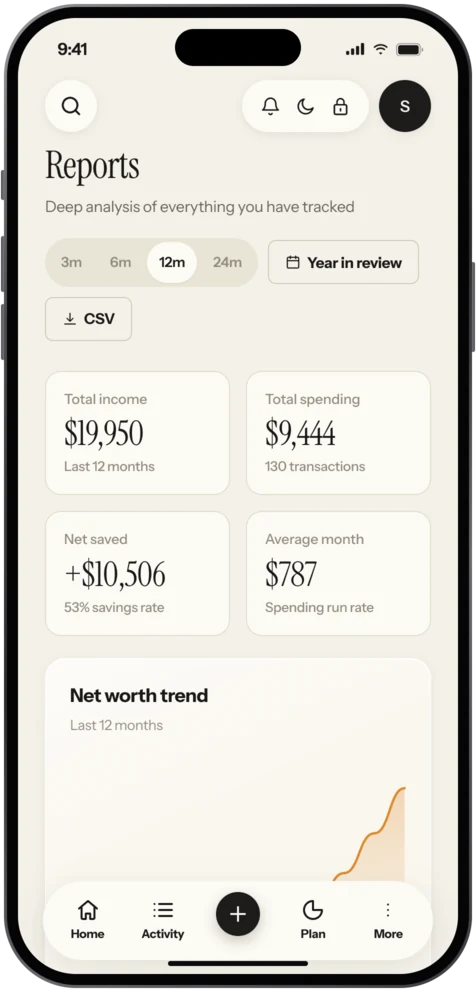
The Reports screen shows income, spending and net saved over three, six, twelve or twenty-four months. A Year in review sums up the year. You can export to CSV if you want to look at the data somewhere else, and there are backups and undo, because everyone mis-taps eventually.
A small example, labelled as an example: suppose you spend 420 on groceries, 180 on eating out and 95 on transport in a month. Seen separately those are three small numbers. Seen as a share of a 2,400 income they are 29 percent, and you can decide whether that matches what you want your life to look like. The tracker is not judging you. It is making the pattern visible.
Expenses versus a budget
Tracking tells you what happened; a budget tells you what you intend. You need both, and they work best together. Vaulta lets you set budgets by category and then shows what is left as you log spending. For the thinking behind that, see budget app for iPhone and the Journal piece on reading a bank statement.
Tracking for work
Premium adds business expense tagging, which helps if you pay for work things personally and want to separate them later. It marks the spending; it does not file anything for you, and it is not tax advice. See tax-season receipt habits for a calm way to keep records.
Where it falls short
Vaulta does not pull every transaction automatically for most countries, because bank linking exists in only eight. If you want fully automatic import in a country outside that list, an expense tracker that relies on manual entry will feel slower. The trade is privacy and control for a few seconds of typing.
A tracking habit that sticks
Pick a trigger you already have, such as the moment you sit down on the train home, and log the day's spending then. Batch tracking in one short sitting works better for many people than logging each purchase on the spot. If you miss a day, do not backfill from memory for a week. Look at your bank statement once, fill the gaps, and carry on. Perfect records matter less than records you keep for a whole year.
In the app
How tracking works in Vaulta
- Add an expense with an amount and a category, or scan a receipt on Pro.
- Check the transaction that Vaulta read from the receipt, fix anything, then save.
- Watch the budget for that category show what is left.
- Open Reports for the month, quarter or year.
- Export to CSV if you want a copy.
Questions.
Can I track expenses for free?
Yes. Manual entry is unlimited on the Free plan with no time limit.
Does Vaulta read receipts?
Yes, on Pro and Premium. You review the result before it is saved. Pro has 50 reads a month and Premium 150.
Can I import from a spreadsheet or bank file?
You can import transactions from a CSV file on every plan.
Does it work outside the US?
Yes. Manual tracking works in any country. Optional bank linking exists in eight countries.
Related
Receipt scannerPhotograph a receipt and Vaulta reads merchant, items and total into a transaction you review first. Pro and Premium. Coming to the App Store.Budget app for iPhoneVaulta is a budget app for iPhone built around one number: what you can spend today. Free plan with no time limit. Coming to the App Store.Subscription trackerSee every subscription with its monthly and yearly cost, and let the radar find recurring charges you forgot. Coming to the App Store.Personal finance app for iOSA personal finance app for iPhone: safe to spend, budgets, goals, bills, net worth, forecast and an AI advisor. Free plan, no time limit.Coming to the App Store.
Free to start. Pro is free for 7 days.