 Vaulta
A receipt scanner that you check before it saves.
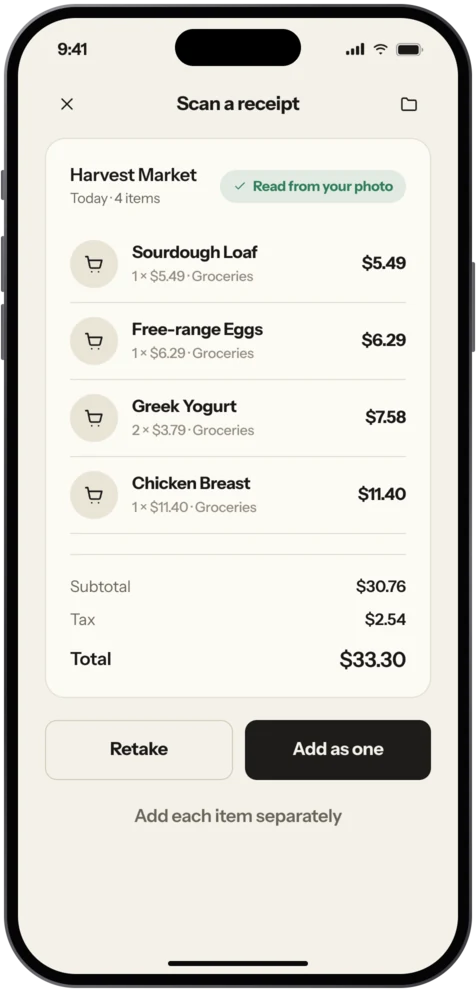
Photograph a receipt and Vaulta reads the merchant, items and total. You look it over, fix anything, and only then does it become a transaction.
Free plan with no time limit. Pro is free for 7 days. Screens show sample data.
Why scanning helps
Receipts are the paper trail behind your spending, and they fade, get lost or end up crumpled at the bottom of a bag. The few that matter, for returns, warranties or records, matter a lot. Photographing a receipt on the spot turns a fragile bit of paper into a record that stays.
The second reason is entry speed. Typing in merchant, items and total takes a minute. A photo takes a few seconds, and you only fix what the reader got wrong.
How scanning works in Vaulta
On Pro and Premium, point your camera at a receipt. Vaulta reads the merchant, the line items and the total, and builds a transaction. Nothing is saved until you have reviewed it. That review step is deliberate: a reader can misread a smudged total or a faded date, and the person who knows is you.
Product photos work too. If you want to record something you bought without a receipt, a photo of the product can be read in the same way. Pro includes 50 receipt reads and 50 product reads a month. Premium includes 150 of each. Limits reset monthly.
What happens to the photo
When you scan, the photo is sent to Google Gemini to be read. This happens only at the moment you scan; Vaulta does not upload your camera roll or scan in the background. The details are in the privacy policy. If you would rather not send photos, you can enter transactions by hand on any plan with no limit, and nothing else in the app depends on scanning.
A good receipt habit
You do not need to scan everything. A small rule works better than a perfect archive:
- Scan anything over an amount you choose, for example 50.
- Scan anything with a warranty: electronics, appliances, tools.
- Scan work-related purchases, so they are easy to find later.
- Bin the rest, or keep them until the return window closes.
The Journal piece on receipts, warranties and records explains how long to keep different kinds of paper, and the tax-season folder habit shows a calm way to sort them. Neither is tax or legal advice; rules differ by country.
Business expenses
Premium adds business expense tagging. If you buy supplies or software for work on a personal card, tag the transaction when you review the scan. Later you can see what you spent on work. Vaulta does not file anything or decide what is deductible.
What to expect
Printed, flat, well-lit receipts read best. Thermal paper that has faded, crumpled slips and handwritten bills are harder, and some will need manual fixes. This is why the review step is a feature rather than an inconvenience.
Getting a clean read
Lay the receipt flat on a dark table in good light. Fill the frame with the receipt and keep your hand steady for a second. If it is long, fold it so the total is visible, or scan it in two parts. Faded thermal paper often reads better outdoors in daylight than under a warm lamp. If the total is wrong after scanning, fixing one number takes a few seconds, and that review is the reason nothing is saved until you say so.
In the app
How scanning works in Vaulta
- Open the scanner and photograph the receipt on a flat, well-lit surface.
- Wait a moment while the photo is read.
- Check the merchant, items and total. Fix anything that looks wrong.
- Add a category, and a business tag on Premium.
- Save. The transaction updates your budget for that category.
Questions.
Is receipt scanning on the Free plan?
No. It is part of Pro and Premium. Free users add transactions by hand with no limit.
Where do my photos go?
To Google Gemini, only when you scan. See the privacy policy for details.
How many scans do I get?
Pro has 50 receipt reads and 50 product reads a month. Premium has 150 of each.
Does it save automatically?
No. You review the result before anything is saved.
Related
Expense trackerTrack expenses on iPhone without the chore. Add spending by hand, scan receipts on Pro, and see where each month goes. Coming to the App Store.Subscription trackerSee every subscription with its monthly and yearly cost, and let the radar find recurring charges you forgot. Coming to the App Store.Personal finance app for iOSA personal finance app for iPhone: safe to spend, budgets, goals, bills, net worth, forecast and an AI advisor. Free plan, no time limit.Budget app for iPhoneVaulta is a budget app for iPhone built around one number: what you can spend today. Free plan with no time limit. Coming to the App Store.Coming to the App Store.
Free to start. Pro is free for 7 days.