 Vaulta
A subscription tracker for the charges you forgot about.
Small recurring charges are easy to ignore and hard to remember. Vaulta lists them with a yearly total, and the radar looks for the ones you missed.
Free plan with no time limit. Pro is free for 7 days. Screens show sample data.
Why subscriptions slip through
A subscription is designed to be forgotten. You sign up, the first month is cheap or free, and a year later you are paying for something you opened twice. No single charge is a crisis, which is exactly why they survive.
The numbers add up faster than people expect. Ten subscriptions averaging 8 a month is 80 a month, which is 960 a year. As a labelled example, if half of those are things you barely use, cancelling them frees roughly 480 a year without changing anything you enjoy.
Seeing the yearly cost
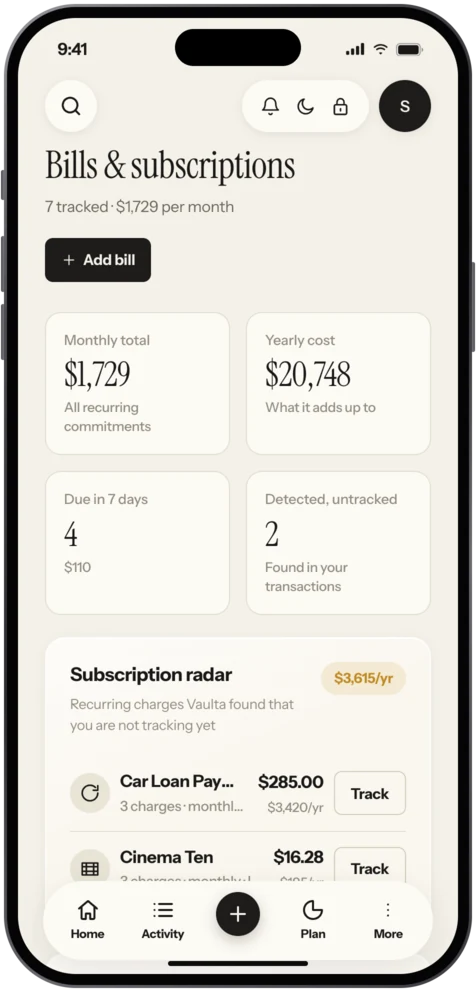
Vaulta lists every bill and subscription with what it costs each month and each year. The yearly figure is the one that changes behaviour. Nobody blinks at 12.99 a month; 155.88 a year makes you ask whether you use it.
You can add subscriptions by hand on the Free plan. Recurring payment detection, the radar, is part of Pro and Premium. It reads the transactions you have recorded, spots charges that repeat, and suggests adding them. It works from your own data, so the more complete your records, the better it does.
A 15 minute audit
You do not need an app to start. The Journal has a step-by-step guide to auditing your subscriptions in 15 minutes. The short version:
- Open your last two bank or card statements.
- Highlight anything that repeats.
- Put each one on a list with its monthly cost.
- For each, ask three questions: did I use it this month, would I buy it again today, is there a cheaper plan?
- Cancel what fails two of three.
A tracker then keeps the list alive so you do not need to do the audit again next year.
Trials and renewals
Free trials are where most unwanted subscriptions begin. When you start one, add it to Vaulta with the renewal date and set a reminder for two days before. Reminders are scheduled on your device. If you decide to keep it, nothing changes. If not, you cancel before the first charge.
For Apple subscriptions, cancelling is done in your Apple Account on your iPhone: Settings, your name, Subscriptions. Vaulta does not cancel anything for you, and it cannot. It only keeps the list honest.
What it will not catch
Charges paid in cash, through a family member's account or through a service that does not repeat on a fixed pattern will not be detected. If you share a streaming plan and pay your friend back each month, add it by hand. And the radar is a suggestion, not a verdict: you decide what goes on the list.
How this fits the rest of your money
Your subscriptions are part of your fixed costs. Once they are listed, they are subtracted from safe to spend automatically, and they appear in the cash flow forecast. See also bill reminders.
Making cancelling easier
Decide in advance what counts as a reason to keep something: used at least twice a month, or would be missed. Anything else goes. Cancel the week you notice, not next month. If you are unsure, cancel and resubscribe later; most services let you. Put a yearly reminder in your calendar to repeat the audit, because new subscriptions creep in just as the old ones go.
In the app
How it works in Vaulta
- Add subscriptions by hand with amount, renewal date and frequency.
- Read the monthly and yearly totals.
- On Pro, open the radar to see recurring charges it found.
- Set a reminder two days before each renewal.
- Cancel in your Apple Account or with the provider, then remove the item.
Questions.
Can Vaulta cancel subscriptions for me?
No. Vaulta cannot move money or cancel services. It keeps the list and reminds you.
What does the radar do?
It looks at recorded transactions on Pro and Premium and suggests recurring charges you have not added.
Is subscription tracking free?
You can list subscriptions by hand on the Free plan. Detection is a Pro and Premium feature.
Where do I cancel an Apple subscription?
In Settings on your iPhone: tap your name, then Subscriptions.
Related
Bill remindersList every bill with due dates, monthly and yearly totals, and local reminders on your iPhone. Bills feed safe to spend. Coming to the App Store.Expense trackerTrack expenses on iPhone without the chore. Add spending by hand, scan receipts on Pro, and see where each month goes. Coming to the App Store.Cash flow forecastSee where your balance is heading month by month, as a range with the reasoning shown. Built from your own transactions. Pro and Premium.Budget app for iPhoneVaulta is a budget app for iPhone built around one number: what you can spend today. Free plan with no time limit. Coming to the App Store.Coming to the App Store.
Free to start. Pro is free for 7 days.