 Vaulta
Savings goals with a date and a monthly amount.
A goal without a date is a wish. Vaulta works out the monthly amount, shows if you are on track and takes it out of what is safe to spend.
Free plan with no time limit. Pro is free for 7 days. Screens show sample data.
The problem with vague goals
"Save for a holiday" does not survive contact with a normal month. Rent arrives, a friend has a birthday, the car needs tyres. Without a number and a date, the goal quietly loses every argument with the present.
A goal that works has three parts: an amount, a date and a monthly figure that connects them. Everything else is decoration. If you want 1,800 for a trip in nine months, the monthly figure is 200. If 200 is too much, you can move the date or lower the amount. Either way you are making a decision, not hoping.
How goals work in Vaulta
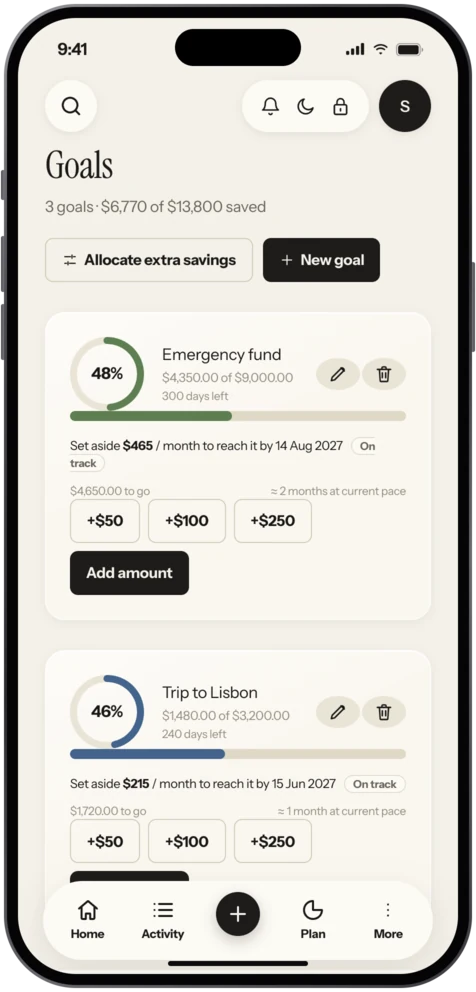
You name the goal, give the target amount and the date. Vaulta works out the monthly amount and whether you are on track given what you have put in so far. Quick buttons let you add to a goal without opening a form.
The part that matters most is the link to safe to spend. The monthly amount for each goal is reserved before the daily number is shown. So if you open the app to check whether you can afford a dinner out, the number already has the holiday money taken out. You are not tempted by balance that is secretly spoken for.
The Free plan includes 1 goal. Pro and Premium remove the limit, which suits people with several things on the go: a holiday, a laptop, a deposit.
A worked example, labelled as an example
Say you want to buy a 1,200 laptop in 8 months and you already have 150.
- Remaining amount: 1,200 minus 150 equals 1,050.
- Months left: 8.
- Monthly amount: 1,050 divided by 8 equals 131.25.
If your savings earn interest the figure is slightly lower; the savings goal calculator handles that. If 131.25 is too much, 12 months brings it to 87.50. Seeing both options takes ten seconds and makes the trade-off honest.
Goals and emergency money
Keep your emergency fund separate from fun goals. If you raid the safety money for a trip, you lose both the trip and the safety. The emergency fund calculator can size the first one. The Journal piece on sinking funds explains how to use goals for known yearly bills so they never arrive as a shock.
Staying on track
Check the goal when you are paid, not when you remember. Move the monthly amount the same day income lands. If you miss a month, do not abandon the goal. Add the missed amount across the remaining months and see whether the new figure is still reasonable. The app does the sum; you make the call.
What it will not do
Vaulta does not move money into a savings account for you. It tracks and reserves in its own numbers; the actual transfer is yours to make. That is deliberate, because Vaulta cannot move money at all.
Picking the right goals
Start with the ones that protect you, then the ones that please you. A small emergency buffer comes first, then any goal with a hard deadline such as a deposit or a wedding, then softer goals like a new phone. Give each goal a realistic date. If you set three goals that together need more than you can save, the result is not three goals, it is three missed targets. Fewer goals with firm dates beat a long wish list.
In the app
How goals work in Vaulta
- Create a goal with a name, a target amount and a date.
- See the monthly amount and whether you are on track.
- Add to the goal with the quick buttons when you set money aside.
- Check Safe to spend. The goal amount has already been reserved.
- Adjust the date or amount if life changes.
Questions.
How many goals can I have?
One on the Free plan. Pro and Premium have unlimited goals.
Does Vaulta move money for me?
No. It tracks and reserves in its own numbers. Vaulta cannot move money.
Do goals affect the daily number?
Yes. The monthly amount for each goal is taken out before safe to spend is shown.
Can I change a goal later?
You can change the amount or the date and the monthly figure updates.
Related
Savings goal calculatorFind the monthly amount you need to hit a savings target by a date, or how long your current monthly amount will take. Optional interest. Free.Emergency fund calculatorWork out your emergency fund target from monthly essentials and how many months you want covered, and how long it takes to get there. Free.Budget app for iPhoneVaulta is a budget app for iPhone built around one number: what you can spend today. Free plan with no time limit. Coming to the App Store.Cash flow forecastSee where your balance is heading month by month, as a range with the reasoning shown. Built from your own transactions. Pro and Premium.Coming to the App Store.
Free to start. Pro is free for 7 days.